Saturday, July 6, 2024

Setup Pycharm into Deepin DE on ArchLinux 2.8.1 in VENV

 Deepin Desktop allows straightforward installation on Arch Linux.  Just don't forget to configure network interface during archinstall run. It might be easily installed alongside with Gnome 46 on the same KVM Guest. You may select any virtual disk layout available in meantime. Say allocate "home" lvm for Pycharm projects.


Now install the most recent version of Pycharm Community Edition via snap. Same setup is also possible via yay and AUR

$ sudo pacman -S base-devel tk git
$ cd snapd
$ makepkg -si
$ sudo systemctl enable --now snapd.socket
$ cd
$ sudo ln -s /var/lib/snapd/snap /snap
$ sudo snap install pycharm-community --classic

Another option is to build "yay" to access AUR packages
$ sudo pacman -S --needed base-devel git
$ git clone https://aur.archlinux.org/yay-git.git
$ cd yay-git
$ makepkg -si
Perform 3D matplot graph using python 3.12.4 as interpreter 


UPDATE as of 07/11/2024    Install Deepin Desktop Environment In Arch Linux && Clones (CLI version)

https://ostechnix.com/install-deepin-desktop-environment-arch-linux/


Thursday, June 27, 2024

Arch Linux installer "Archinstall" 2.8.1 adds experimental LVM support

Following below is attempt to reproduce sample described in  https://www.phoronix.com/news/Archinstall-2.8.1-Released in virtual environment . To perform the testing first of all

# pacman -Sy archinstall   [upgrade 2.8.0-2 => 2.8.1-1]

Then follow standard schema deploying Arch Linux Guest under KVM Hypervisor .

# archinstall


You may clearly see in the video https://www.youtube.com/watch?v=RJ6O0AglqQo&t=2s how to switch to testing been performed in the post above. Video itself is pretty nice, however, LVM feature evaluating was skipped in this video, regardless version of archinstall was upgraded to 2.8.1-1.

Per https://news.itsfoss.com/archinstall-lvm/

Then there are the plans to support encryption for LVMs across partitions, an option to manually configure LVM, and to deal with pre-mounted LVM volumes for the Pre-mount menu option.


References

https://www.phoronix.com/news/Archinstall-2.8.1-Released


Saturday, June 1, 2024

Setup KVM Hypervisor on LMDE 6

 In particular case the original set  of packages differs from Debian 12.5 and Sparky Linux 2024.05 ones

$ sudo apt install qemu-system libvirt-daemon-system libvirt-clients bridge-utils virt-manager -y

 $ sudo virsh net-start default
 $ sudo virsh net-autostart default                    
 $ sudo modprobe vhost_net 
 $ lsmod | grep vhost
 $ echo vhost_net | sudo tee -a /etc/modules
 $ sudo usermod -a -G libvirt  $(whoami)
 $ sudo reboot

 Install Web Cockpit Console
 $  sudo apt install cockpit cockpit-machines
 $  sudo systemctl start cockpit.socket

 Update of /usr/lib/systemd/system/cockpit.service is still required  two lines below are supposed to be added to *.service file :
  [Install]

  WantedBy=graphical.target

 $  sudo systemctl enable cockpit.socket

 Tuning firewall
 $  sudo apt install firewalld
 Enable and start firewalld service
 $  sudo firewall-cmd --add-service=cockpit --permanent
 $  sudo firewall-cmd --reload 


Wednesday, May 29, 2024

Deployment KaOS 2024.05 as KVM Guest in UEFI mode on Fedora 40 KVM Hypervisor (bare metal)

 Procedure which brought me to success looks a bit unusual in comparison with Virt-Manager configuration for any popular Linux Flavor like Manjaro 24.1, SparkyLinux 2024.05, Suse Tumbleweed and etc. Distro KaOS 2024.05 forced me to select emulation of i440FX Chipset, otherwise it hanged right away (standard case PC_Q35 + ICH9). During Calamares setup folder /boot/efi was not present among classic options of well known drop down menu. See snapshots bellow


Tuesday, May 14, 2024

Setup KVM Hypervisor on SparkyLinux 2024.05

Virt-manager still appears to be the most powerful tool in regards of deployment and managment of KVM guests. Current version in Debian SID is 1:4.1.0-4. The presence of Web Cockpit Console is a nice way to manage KVM guest's via clicking the button "Launch remote viewer"  built into Cockpit Web Console. Bridge attached to external network interface was also created utilizing network management section inside Web Console and provides an alternative for guests attachment via NAT.  

Install KVM

 $ sudo apt install qemu-kvm libvirt-clients libvirt-daemon-system 
                bridge-utils virtinst libvirt-daemon virt-manager -y 
 $ sudo virsh net-start default
 $ sudo virsh net-autostart default                    
 $ sudo modprobe vhost_net 
 $ lsmod | grep vhost
 $ echo vhost_net | sudo tee -a /etc/modules
 $ sudo usermod -a -G libvirt  $(whoami)
 $ sudo reboot

boris@boris-spaky2405:~$ neofetch
                                               boris@boris-spaky2405 
           .            `-:-`                  --------------------- 
          .o`       .-///-`                    OS: SparkyLinux 8 (Seven-Sisters) x86_64 
         `oo`    .:/++:.                       Host: KVM/QEMU (Standard PC (Q35 + ICH9, 2009) pc-q35-8.2) 
         os+`  -/+++:` ``.........```          Kernel: 6.9.0-sparky8-amd64 
        /ys+`./+++/-.-::::::----......``       Uptime: 1 min 
       `syyo`++o+--::::-::/+++/-``             Packages: 2474 (dpkg) 
       -yyy+.+o+`:/:-:sdmmmmmmmmdy+-`          Shell: bash 5.2.21 
::-`   :yyy/-oo.-+/`ymho++++++oyhdmdy/`        Resolution: 1280x800 
`/yy+-`.syyo`+o..o--h..osyhhddhs+//osyy/`      Terminal: /dev/pts/1 
  -ydhs+-oyy/.+o.-: ` `  :/::+ydhy+```-os-     CPU: AMD Ryzen 7 3700X (8) @ 3.599GHz 
   .sdddy::syo--/:.     `.:dy+-ohhho    ./:    GPU: 00:01.0 Red Hat, Inc. Virtio 1.0 GPU 
     :yddds/:+oo+//:-`- /+ +hy+.shhy:     ``   Memory: 906MiB / 15631MiB 
      `:ydmmdysooooooo-.ss`/yss--oyyo
        `./ossyyyyo+:-/oo:.osso- .oys                                  
       ``..-------::////.-oooo/   :so                                  
    `...----::::::::--.`/oooo:    .o:
           ```````     ++o+:`     `:`
                     ./+/-`        `
                   `-:-.
                   ``

boris@boris-spaky2405:~$ dpkg -l | grep virt-manager
ii  virt-manager                                             1:4.1.0-4                                all          desktop application for managing virtual machines
boris@boris-spaky2405:~$ dpkg -l | grep virtinst
ii  virtinst                                                 1:4.1.0-4                                all          utilities to create and edit virtual machines
boris@boris-spaky2405:~$ sudo virsh --connect qemu:///system
[sudo] password for boris: 
Welcome to virsh, the virtualization interactive terminal.

Type:  'help' for help with commands
       'quit' to quit

virsh # version
Compiled against library: libvirt 10.2.0
Using library: libvirt 10.2.0
Using API: QEMU 10.2.0
Running hypervisor: QEMU 8.2.3


Install Web Cockpit Console
 $  sudo apt install cockpit cockpit-machines
 $  sudo systemctl start cockpit.socket

 Update of /usr/lib/systemd/system/cockpit.service is still required  two lines below are supposed to be added to *.service file :
  [Install]

  WantedBy=graphical.target

 $  sudo systemctl enable cockpit.socket

 Tuning firewall
 $  sudo apt install firewalld
 $  sudo firewall-cmd --add-service=cockpit --permanent
 $  sudo firewall-cmd --reload


Virt-manager 1:4.1.0-4 was submitted to SID on 05/14/2024


Friday, May 3, 2024

Manjaro Testing Instance setup as KVM Guest in UEFI mode (Fedora 40 KVM Hypervisor)

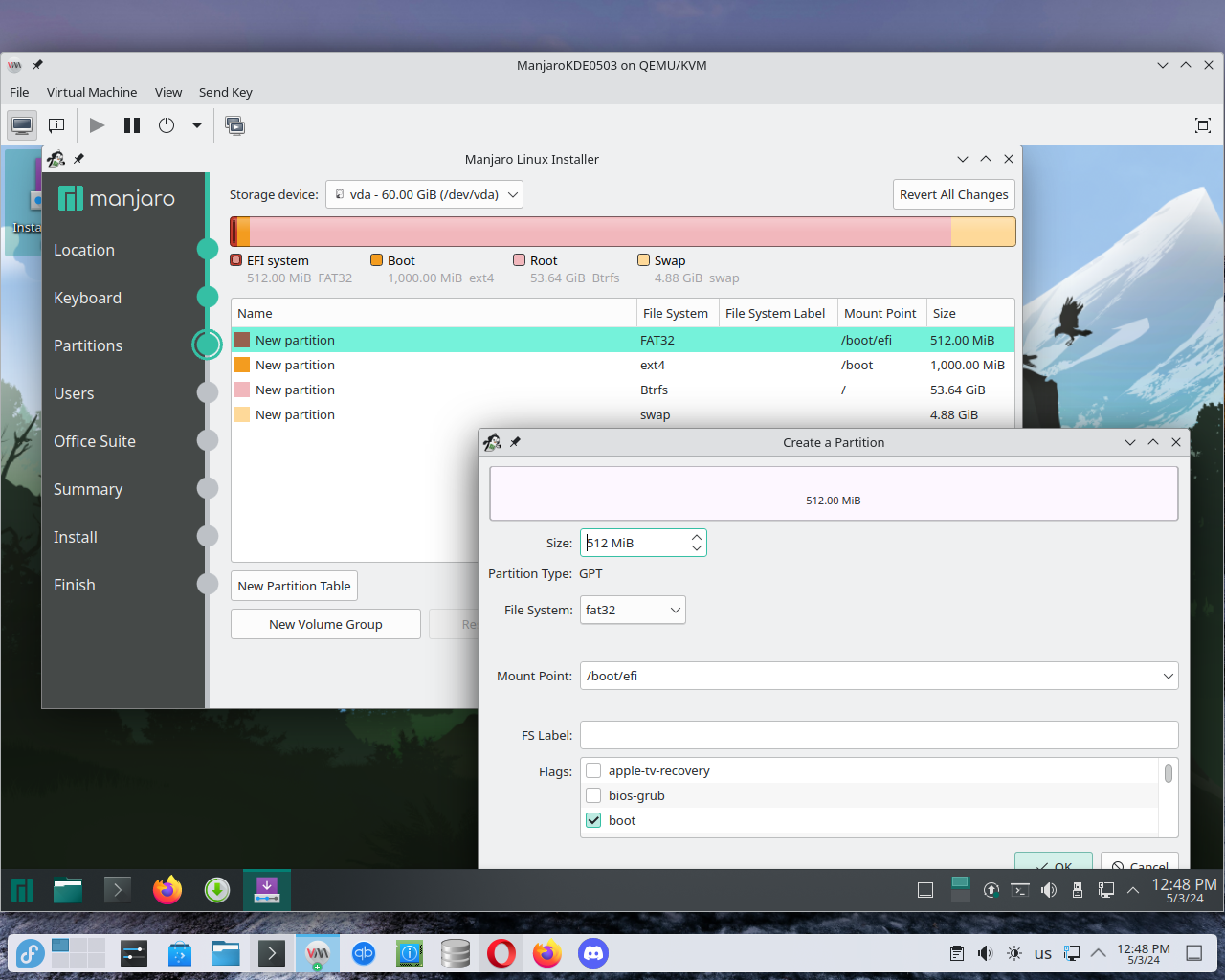
 Original Virt-manager UEFI option setup  should be configured as follows /usr/share/edk2/ovmf/OVMF_CODE_4M.qcow2 . Next step is supposed to be creating /boot/efi  fat32 EFI partition during Calamares Installer virtual disk layout configuration

Creating /boot/efi partition performing instance setup via Calamares Installer


Runtime snapshots after upgrading instance deployed via ISO image as of 04/06/2024 up to Manjaro Testing Instance, followed by kernel upgrade up to 6.8.8-2


Same Virt-Manager UEFI option setup allows to deploy CachyOS-240401 KVM Guest in UEFI mode


EndeavourOS 24.04 as KVM Guest in UEFI Mode


UPDATE as of 05/05/2024 

Deploying KVM Guests in UEFI mode on 

Manjaro Testing KVM Host


Wednesday, May 1, 2024