Thursday, August 27, 2020

Install KVM&Libvirt on SparkyLinux2020.08

Deployment of simple SparkyLinux2020.08 configuration on bare metal is supposed to be performed with "btrfs" file-systems for "/boot" and "/" .Otherwise virt-manager will report failure of deploying any guest due to /var/lib/libvirt/images/ "folder" , which for Libvirt 6.6.0 && Qemu 5.1.0, should already belong to "btrfs" formatted file-system at least at the time of writing of this post.


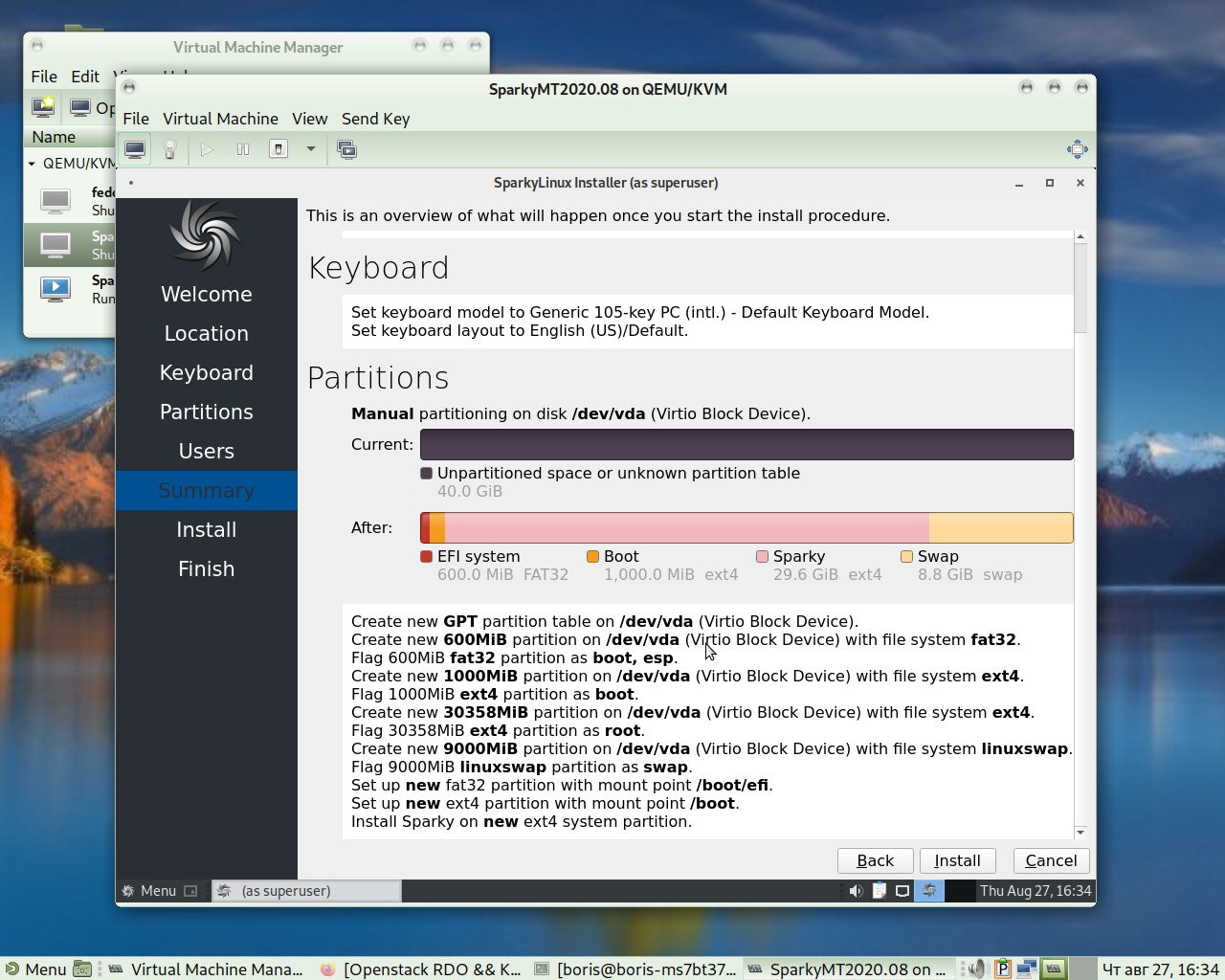
Another sample of original partitioning (Calamaris on SparkyLinux)


Install KVM

$ sudo apt install qemu-kvm  \
         libvirt-daemon bridge-utils \
         virtinst libvirt-daemon-system -y

$ sudo apt install virt-top libosinfo-bin \
       qemu-system virt-manager -y


$ sudo modprobe vhost_net
$ lsmod | grep vhost
$ echo vhost_net | sudo tee -a /etc/modules
$ sudo reboot

$ echo vhost_net | sudo tee -a /etc/modules
$ sudo reboot


Following below is verification deployment os SparkyLinux 2020.08 as KVM
guest in environment shown right above
 

   Installed Sparky Guest does automatically rolling forward to the most recent status of it's repos


  Access via Web Cockpit Console


Friday, August 21, 2020

Test Day:2020-08-17 Kernel 5.8 on Fedora 32

Install koji
$ sudo dnf install koji -y

Build kernel via koji
$ koji download-build --arch=x86_64 kernel-5.8.2-300.fc32 && sudo dnf update kernel*

[boris@ServerFedora32 ~]$ ls -l  *.rpm
-rw-rw-r--. 1 boris boris    52776 Aug 21 16:08 kernel-5.8.2-300.fc32.x86_64.rpm
-rw-rw-r--. 1 boris boris 34945992 Aug 21 16:10 kernel-core-5.8.2-300.fc32.x86_64.rpm
-rw-rw-r--. 1 boris boris    52884 Aug 21 16:08 kernel-debug-5.8.2-300.fc32.x86_64.rpm
-rw-rw-r--. 1 boris boris 36848900 Aug 21 16:09 kernel-debug-core-5.8.2-300.fc32.x86_64.rpm
-rw-rw-r--. 1 boris boris 14038096 Aug 21 16:10 kernel-debug-devel-5.8.2-300.fc32.x86_64.rpm
-rw-rw-r--. 1 boris boris 31850344 Aug 21 16:08 kernel-debug-modules-5.8.2-300.fc32.x86_64.rpm
-rw-rw-r--. 1 boris boris  2188616 Aug 21 16:08 kernel-debug-modules-extra-5.8.2-300.fc32.x86_64.rpm
-rw-rw-r--. 1 boris boris   171972 Aug 21 16:08 kernel-debug-modules-internal-5.8.2-300.fc32.x86_64.rpm
-rw-rw-r--. 1 boris boris 13943992 Aug 21 16:10 kernel-devel-5.8.2-300.fc32.x86_64.rpm
-rw-rw-r--. 1 boris boris 31182616 Aug 21 16:09 kernel-modules-5.8.2-300.fc32.x86_64.rpm
-rw-rw-r--. 1 boris boris  2110908 Aug 21 16:08 kernel-modules-extra-5.8.2-300.fc32.x86_64.rpm
-rw-rw-r--. 1 boris boris   162120 Aug 21 16:08 kernel-modules-internal-5.8.2-300.fc32.x86_64.rpm
.  .  .  .  .   .  .  .  .  .  .
=================================================================
 Package                        Architecture     Version                     Repository              Size
=================================================================
Installing:
 kernel                         x86_64           5.8.2-300.fc32              @commandline            52 k
 kernel-modules                 x86_64           5.8.2-300.fc32       @commandline            30 M
 kernel-modules-extra           x86_64           5.8.2-300.fc32   @commandline           2.0 M
Installing dependencies:
 kernel-core                    x86_64           5.8.2-300.fc32              @commandline            33 M
Transaction Summary
==================================================================
Install  4 Packages

Total size: 65 M
Installed size: 105 M
Is this ok [y/N]: y
Downloading Packages:
Running transaction check
Transaction check succeeded.
Running transaction test
Transaction test succeeded.
Running transaction
  Preparing        :                                                                                  1/1 
  Installing       : kernel-core-5.8.2-300.fc32.x86_64                                                1/4 
  Running scriptlet: kernel-core-5.8.2-300.fc32.x86_64                                                1/4 
  Installing       : kernel-modules-5.8.2-300.fc32.x86_64                                             2/4 
  Running scriptlet: kernel-modules-5.8.2-300.fc32.x86_64                                             2/4 
  Installing       : kernel-5.8.2-300.fc32.x86_64                                                     3/4 
  Installing       : kernel-modules-extra-5.8.2-300.fc32.x86_64                                       4/4 
  Running scriptlet: kernel-modules-extra-5.8.2-300.fc32.x86_64                                       4/4 
  Running scriptlet: kernel-core-5.8.2-300.fc32.x86_64                                                4/4 
  Running scriptlet: kernel-modules-extra-5.8.2-300.fc32.x86_64                                       4/4 
  Verifying        : kernel-5.8.2-300.fc32.x86_64                                                     1/4 
  Verifying        : kernel-core-5.8.2-300.fc32.x86_64                                                2/4 
  Verifying        : kernel-modules-5.8.2-300.fc32.x86_64                                             3/4 
  Verifying        : kernel-modules-extra-5.8.2-300.fc32.x86_64                                       4/4 

Installed:
  kernel-5.8.2-300.fc32.x86_64                     kernel-core-5.8.2-300.fc32.x86_64                     
  kernel-modules-5.8.2-300.fc32.x86_64             kernel-modules-extra-5.8.2-300.fc32.x86_64            

Complete!
Reboot into new kernel

[boris@ServerFedora32 ~]$ hostnamectl
   Static hostname: ServerFedora32.localdomain
         Icon name: computer-desktop
           Chassis: desktop
        Machine ID: 5596dcdb82ee450494fd8d062605cd6a
           Boot ID: dfa47fc6014f4c1b8ef6b04048bcd1e8
  Operating System: Fedora 32 (Server Edition)
       CPE OS Name: cpe:/o:fedoraproject:fedora:32
            Kernel: Linux 5.8.2-300.fc32.x86_64
      Architecture: x86-64

Per QA:Testcase kernel regressionQA:Testcase kernel regression

*****************************
Setting up testing environment
*****************************
$ sudo dnf install gcc git python3-fedora
$ git clone https://pagure.io/kernel-tests.git
$ sudo dnf install make libtirpc libtirpc-devel policycoreutils-python-utils
$ sudo semanage boolean -m --on selinuxuser_execheap
$ cd kernel-tests
$ cp config.example .config
$ vi .config
*********************************
Starting testing scripts themselves
*********************************
$ sudo ./runtests.sh
$ sudo ./runtests.sh -t performance

Testing done logs have been generated
$ cd logs
$ ls -l
vi kernel-test-1598018939.log.txt
vi kernel-test-1598019040.log.txt
$ sudo semanage boolean -m --off selinuxuser_execheap
===========================================================
Date: Fri 21 Aug 2020 05:08:59 PM MSK
Test set: default
Kernel: 5.8.2-300.fc32.x86_64
Release: Fedora release 32 (Thirty Two)
Result: PASS
Failed Tests: None
Warned Tests: None
============================================================
Date: Fri 21 Aug 2020 05:10:40 PM MSK
Test set: performance
Kernel: 5.8.2-300.fc32.x86_64
Release: Fedora release 32 (Thirty Two)
Result: PASS
Failed Tests: None
Warned Tests: None
============================================================

Monday, August 10, 2020

Attempt to switch MSI X570 A PRO to Legacy BIOS ( just for fun )

***********************
UPDATE on 13/09/2020
***********************
MSI X570 A-PRO BIOS Setup to enable KVM:-
===================================
Go to 
OS MODE =>CPU Features=>SVM=>Enabled (was Disabled). 
It would eliminate "killing KVM by BIOS"in dmesg LOG . 
$ dmesg| grep kvm
[ 4.376968] kvm: Nested Virtualization enabled
[ 4.376978] SVM: kvm: Nested Paging enabled
I sincerely apologize for wrong pinging. Ryzen 5 3600 is OK. MSI X570 A-PRO Setup is hard to analyze
***********************
UPDATE on 15/08/2020
***********************
   Obviously I've turned everything back to UEFI
   I have to notice that either one of options
     1. UEFI
     2. LEGACY+UEFI
     3. LEGACY BIOS
DOESN'T create device /dev/kvm and I still have to care about
UEFI support for KVM guests


I also have to notice that even Ryzen 7 3700X (5 3600 just worse)  shows up pretty pure performance during deployment KVM guests. Looks like I am spoiled by Intel.
***************
END UPDATE
***************  
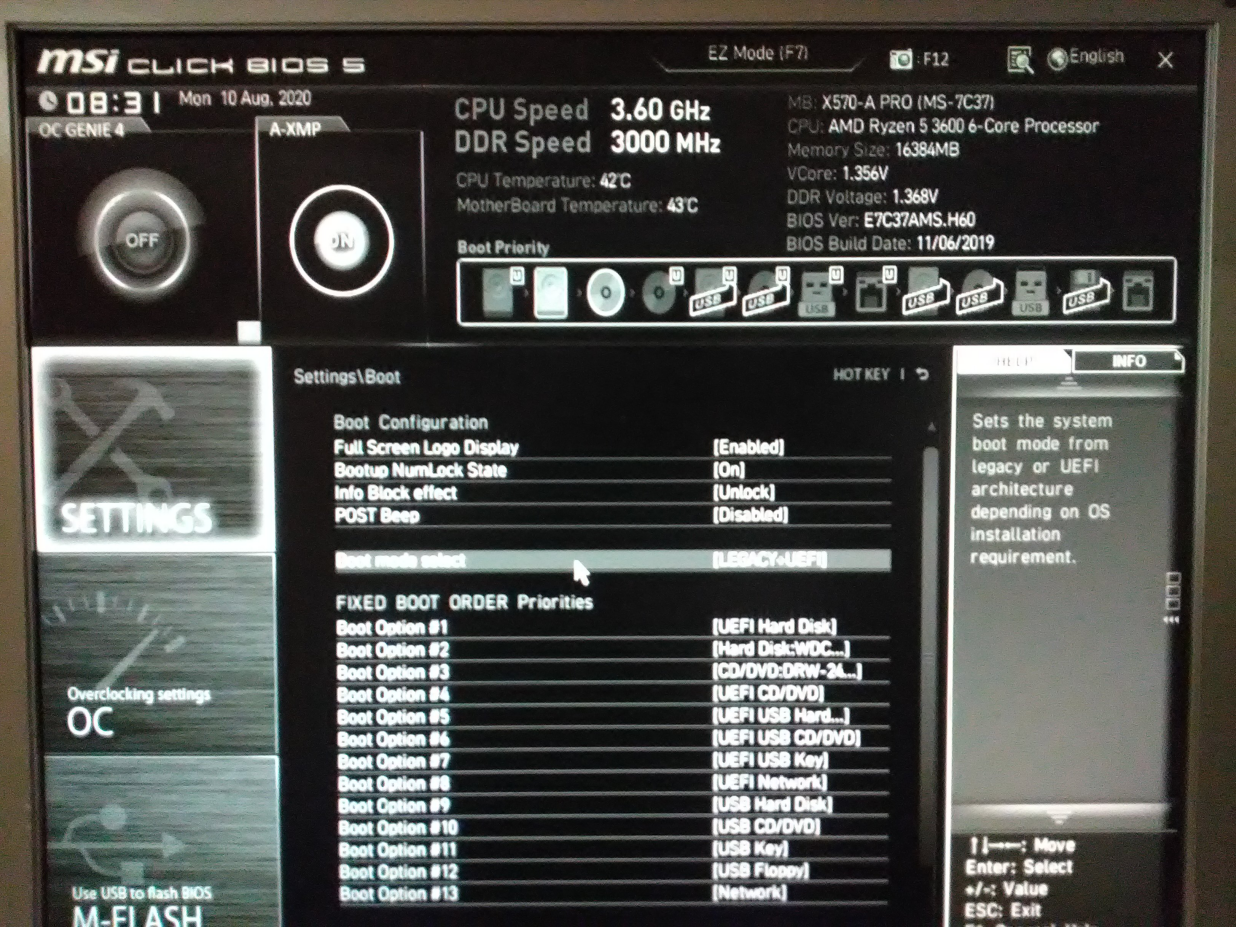
Officially  only options LEGACY+UEFI and UEFI were available. To install Server F32 on SSD Drive I selected CD-DVD device as boot able. Afterwards everything went fine and system was installed  in pure Legacy BIOS Mode on SSD. Problem has raised up a bit latter after testing via pressing "F11"  I was able to make sure that SSD drive is a primary boot able device and decided to make this configuration static. But any drive from nice line of small pictures
"Boot Priority" gave me a wrong drive.  SSD seemed to be gone  from  "Boot Priority" line.

Three steps which allowed me to set up SSD Drive as primary boot able are shown below
1. Select OS Setting "Boot" menu.


Scroll it down to invisible options following up the visible list


Click on first line "Hard Disk Drives BBS priorities". BBS stands for "Bios Boot priority", to get into final selection supposed to bring you to success. Of course, if setting up "Legacy BIOS" in meantime might be associated with word "success".


Select SSD Drive from all options available and press "Enter"  followed by "F10". I believe that this exercise might be a bit more straight forward ( even Legacy BIOS is almost dead ).  
That's why I also believe that board's prices difference between ASUS and MSI is quite reasonable. Just around $100 and $200.


Thursday, July 23, 2020

Enable UEFI Support For KVM Virtual Machines on F32 Server via Web Cockpit Console

The major target of posting below is supposed to demonstrate that virt-manager is not required to enable UEFI support for KVM Guest on Linux . See recent post at Lxer Enable UEFI Support For KVM Virtual Machines In Linux
First - don't specify "Start immediately" and switch Firmware to "UEFI" been inside Web Cockpit Console 


   When Firmware has been set to "UEFI"  start "INSTALL". UEFI Console will be brought up immediately and you can proceed as usual


 Now we are ready proceed with net boot installation CentOS 8.2 KVM on UEFI box.
Installation  completed

   Reboot KVM guest as requered


UEFI support for Manjaro 20.0.3 KVM Guest


Friday, July 17, 2020

Managing bridges to real and virtual networks for KVM guests via Web Cockpit Console

Post below is an immediate follow up for
http://lxer.com/module/newswire/view/288336/index.html
Web Cockpit Console creates bridge attached to external network interface in a second. 


Of course it might be done via nmcli , but it will take some time. Also there is no need to destroy default libvirt's network and bridge br0. At start up you specify which bridge to use for particular guest. Just start default network via virsh before deployment 


   We can run at time two CentOS 8.2 KVM guests. First one on office LAN via bridge0 (see picture 1), second one attached to default libvirt's network via bridge br0 (default)


Running guests on different nets


Sunday, July 12, 2020

Install Transmission with web interface on Manjaro Gnome 20.0.3

Transmission by default doesn’t have the web client enabled in it. However, the packages transmission-gtk and transmission-cli  are available via system repositories and  would work for you with a bit a more efforts then on Debian systems. What exactly I mean is  to create manually service unit for transmission-daemon according to systemd requirements and tune several kernel parameters via sysctl to avoid errors at start up of transmission-daemon service.

After complete installation of Manjaro add one more package  
$ sudo pacman -S transmission-cli  

Make sure that your system is configured as follows
~ >>>  pacman -Qs transmission-cli                              

 local/transmission-cli 3.00-1
 Fast, easy, and free BitTorrent client (CLI tools, daemon and web client)
~ >>>  pacman -Qs transmission-gtk                          

  local/transmission-gtk 3.00-1
 Fast, easy, and free BitTorrent client (GTK+ GUI)
~ >>> which transmission-daemon                              

  /usr/bin/transmission-daemon
~ >>> ls -l  /usr/bin/transmission-daemon                          -rwxr-xr-x 1 root root 608920 мая 23 11:43 /usr/bin/transmission-daemon


Now create service unit for transmission-daemon per systemd requirements :-
Change directory to /usr/lib/systemd/system
[boris-pc system]# pwd
/usr/lib/systemd/system

and manually create file  
transmission-daemon.service

[boris-pc system]# cat transmission-daemon.service

[Unit]
Description=Transmission BitTorrent Daemon
After=network.target

[Service]
User=transmission
Type=notify
ExecStart=/usr/bin/transmission-daemon -f --log-error
ExecReload=/bin/kill -s HUP $MAINPID
NoNewPrivileges=true

[Install]
WantedBy=multi-user.target

Then reboot the box


  After system will come back on-line you are supposed to discover symlink under /etc/systemd/system/multi-user.target.wants
[boris-pc multi-user.target.wants]# ls -l transmission-daemon*
lrwxrwxrwx 1 root root 51 июл 11 18:31 transmission-daemon.service -> /usr/lib/systemd/system/transmission-daemon.service
and file 
/var/lib/transmission/.config/transmission-daemon/settings.json
The last one is read by created service and might be updated as follows


Per 

https://wiki.archlinux.org/index.php/transmission 

update /etc/sysctl.d/99-sysctl.conf and restart system without "Failed to set send/receive buffer"  errors  in status report of transmission-daemon service .


After updating settings.json file reload service transmission-daemon, restarting is also harmless. At this point you are all set


Wednesday, July 8, 2020

Install KVM && Web Cockpit Console on Manjaro Gnome 20.0.3

Attempt to test another Linux distro Manjaro Gnome 20.0.3 as Virthost managed via Cockpit Web Console, i.e. deployment and management KVM guests on the recent Manjaro GDM utilizing Web Console rather then virt-manager .
Bare metal platform is Haswell based and has 32 GB RAM. We intend to survive F33 ELN (Enterprise Linux Next) requirement kind of AVX2 CPU's support. Another development box is supposed to have AMD Ryzen (third generation with sufficient number of cores)

Setup KVM on Manjaro
 $ sudo pacman -S virt-manager virt-viewer \
     qemu vde2 ebtables dnsmasq \
     bridge-utils openbsd-netcat

  $ sudo systemctl start libvirtd.service

  $ sudo systemctl status libvirtd.service
  $ sudo systemctl enable  libvirtd.service

 Setup Web Cockpit Console on Manjaro
  $ sudo pacman -S cockpit cockpit-machines
  $ sudo systemctl start cockpit.socket
  $ sudo systemctl status  cockpit.socket
  $ sudo systemctl enable  cockpit.socket

 Setup Firewalld On Manjaro
  $ sudo pacman -S firewalld 
  $ sudo systemctl start firewalld
  $ sudo systemctl status  firewalld
  $ sudo systemctl enable  firewalld

 Open port 9090
  $ sudo firewall-cmd --add-service=cockpit --permanent
  $ sudo firewall-cmd --reload

Now login into Web Console and create bridge attached to external network interface 


Deploy Ubuntu 20.04 && Fedora 32 WKS guests via local ISO images


   Fedora 32 WKS snapshots


Shutdown both VMs and start them up at a time
 

Now start both VMs up clicking the "RUN" button